
Building Robust State Machines: A Practical C# Example
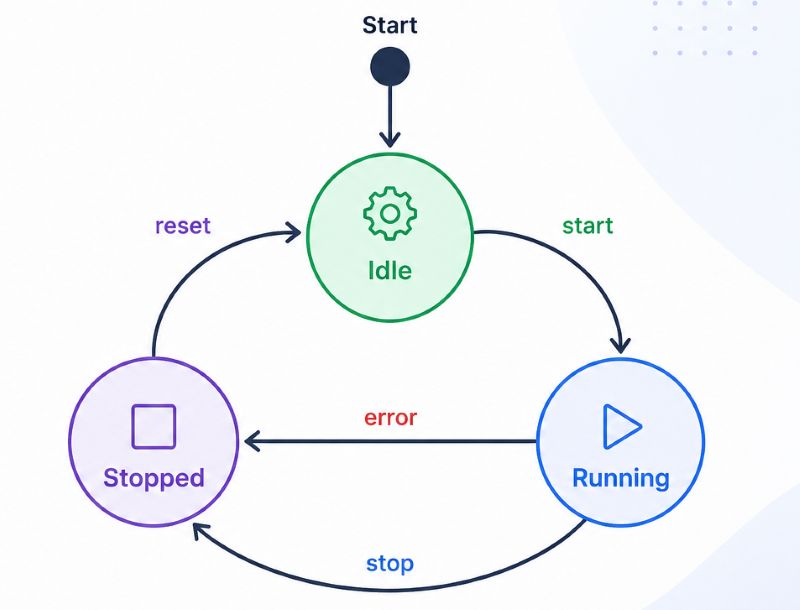
State machines are great way to encapsulate complex logic where we have multiple transitions between one state to another with different conditions. It can be used to avoid complex if-elseif-else or switch-case statements in the way which is elegant and easy to read. In the end it is easier to track and debug state changes and new states and transitions can be added without major changes.
What are the Parts of one State Machine?
State machine consists of:
-
States : Different conditions or modes the system can be in. State in this sense can be anything which represents the current mode or property of one object inside the memory. Some of examples in real world are:
- light switch: on - off
- door: open - closed - locked - unlocked
- task: ready - in progress - in review - deployed - done - cancelled
- blog post: draft - archived - deleted - published
- order: pendingPayment - processing - shipped - delivered - cancelled
- Events : Triggers that cause state transitions.
- In the case of door, it can be Enter PIN correctly. This is the trigger which moves door from state locked to unlocked
- In the case of order, it can be pay the order, which moves order from pendingPayment to processing
- Transitions : Rules that define how the system moves from one state to another. This is basically description of the entire process in order for the state to be changed.
- Actions : Operations performed when entering, exiting, or staying in a state. This is somehow reflection to the outer world.
- In our door example, it can be that when the False PIN entered that we have action to turn the alarm on together with the door stayed in locked state.
- In the case of order, it can be when order is paid, to give signal for packaging on the other side.
Practical Example in C#
Imagine you’re building an e-commerce application that handles order statuses. An order can go through several states before completion. We can show a visual representation as follows.
States and Transitions
-
States :
PendingPayment,Processing,Shipped,Delivered,Cancelled - Events :
Pay(moves from PendingPayment to Processing)Ship(moves from Processing to Shipped)Deliver(moves from Shipped to Delivered)Cancel(moves from PendingPayment to Cancelled or from Processing to Cancelled)
- Actions :
OrderPaid(notify externally that order is paid)OrderShipped(notify externally that order is shipped)
Implementation
Let’s implement a simple state machine using a dictionary to manage state transitions. Additionally, dictionary lookup is O(1), what makes this implementation efficient for most business workflows.
- State Machine Logic :
using System;
using System.Collections.Generic;

class OrderStateMachine
{
    public enum OrderState { PendingPayment, Processing, Shipped, Delivered, Cancelled }
    public enum OrderTrigger { Pay, Ship, Deliver, Cancel }

    public event EventHandler? OrderShipped;
    public event EventHandler? OrderPaid;

    private Dictionary<TransitionFrom, TransitionTo> _stateTransitions;
    public OrderState CurrentState { get; private set; }

    private record TransitionFrom(OrderState State, OrderTrigger Trigger);
    private record TransitionTo(OrderState State, Action? Action);

    public OrderStateMachine()
    {
        CurrentState = OrderState.PendingPayment;
        _stateTransitions = new Dictionary<TransitionFrom, TransitionTo>
        {
            { new TransitionFrom(OrderState.PendingPayment, OrderTrigger.Pay), new TransitionTo(OrderState.Processing, OnOrderPaid) },
            { new TransitionFrom(OrderState.PendingPayment, OrderTrigger.Cancel), new TransitionTo(OrderState.Cancelled, null) },
            { new TransitionFrom(OrderState.Processing, OrderTrigger.Ship), new TransitionTo(OrderState.Shipped, OnOrderShipped) },
            { new TransitionFrom(OrderState.Processing, OrderTrigger.Cancel), new TransitionTo(OrderState.Cancelled, null) },
            { new TransitionFrom(OrderState.Shipped, OrderTrigger.Deliver), new TransitionTo(OrderState.Delivered, null) }
        };
    }

    public void ProcessTransition(OrderTrigger trigger)
    {
        if (_stateTransitions.TryGetValue(new (CurrentState, trigger), out TransitionTo newState))
        {
            Console.WriteLine($"Moving from {CurrentState} to {newState.State} due to {trigger}");
            CurrentState = newState.State;
            newState.Action?.Invoke();
        }
        else
        {
            Console.WriteLine($"Invalid transition: {CurrentState} cannot handle {trigger}");
            throw new InvalidOperationException($"Invalid transition: {CurrentState} cannot handle {trigger}");
        }
    }

    private void OnOrderPaid()
    {
        OrderPaid?.Invoke(this, EventArgs.Empty);
    }

    private void OnOrderShipped()
    {
        OrderShipped?.Invoke(this, EventArgs.Empty);
    }
}
- Client :
var orderStateMachine = new OrderStateMachine();
orderStateMachine.OrderPaid += OrderStateMachine_OrderPayed;
orderStateMachine.OrderShipped += OrderStateMachine_OrderShipped;

Console.WriteLine($"Initial state: {orderStateMachine.CurrentState}");

// Simulating order processing
orderStateMachine.ProcessTransition(OrderStateMachine.OrderTrigger.Pay);
orderStateMachine.ProcessTransition(OrderStateMachine.OrderTrigger.Ship);
orderStateMachine.ProcessTransition(OrderStateMachine.OrderTrigger.Deliver);


void OrderStateMachine_OrderPayed(object? sender, EventArgs e)
{
    Console.WriteLine($"Order is paid. We need to package the order");
}
void OrderStateMachine_OrderShipped(object? sender, EventArgs e)
{
    Console.WriteLine($"Order is shipped. Notify customer!");
}
How It Works
-
The
OrderStateMachineclass encapsulates state logic, making the main program cleaner. -
The
CurrentStateproperty tracks the current order state. -
The
_stateTransitionsdictionary holds valid state transitions. -
The
ProcessTransition()method checks for valid transitions and updates the state. -
The
Actionnotifies external world that something happened inside the state machine on which caller shall react.
Conclusion
State machines are an excellent way to manage complex workflows in a clean, predictable manner. Using a simple dictionary in C#, we can build a flexible and maintainable system to handle order states. By encapsulating state logic in a class, we make our code cleaner, more modular, and easier to maintain. Whether you’re working on UI workflows, business processes, or game logic, state machines provide a nice approach to managing state transitions effectively.

Read More
- Database Migrations in .NET: System Design & Tools
- ASP.NET Core Web API Architecture: A Lightweight Starting Point
- Premature Optimization in Software Development: Examples, Risks, and Best Practices
- The Adapter Pattern in C#: Bridging Incompatible Interfaces
- API Versioning and Integration Testing in ASP.NET Core